Take control of your store’s search visibility with Google Instant Indexing Pro v3, a powerful nopCommerce plugin designed to accelerate how your content is discovered, crawled, and indexed by Google. Instead of waiting for traditional crawling cycles, this plugin directly communicates with Google’s Indexing API—ensuring your products, categories, and updates appear in search results almost instantly.
Built for performance-driven eCommerce businesses, it eliminates indexing delays and transforms how quickly your store responds to changes, giving you a measurable competitive advantage.
Unlock Faster Growth with Google’s Indexing API
In eCommerce, speed equals revenue. When you launch a new product, update pricing, or publish content, delays in indexing can cost visibility and sales. Google Instant Indexing Pro bridges this gap by pushing updates directly to Google, ensuring your store stays current and competitive in real time.
This means your latest products, offers, and content are visible to customers exactly when they matter most.
What is Google’s Indexing API?
Google’s Indexing API allows your store to notify Google instantly whenever a page is added, updated, or removed. Instead of relying solely on search engine bots, your store actively pushes updates—resulting in faster indexing, improved rankings, and better visibility in search results.
✓ Plugin Configuration Panel
Below is the main configuration interface where you connect your store with Google’s Indexing API using service account credentials.
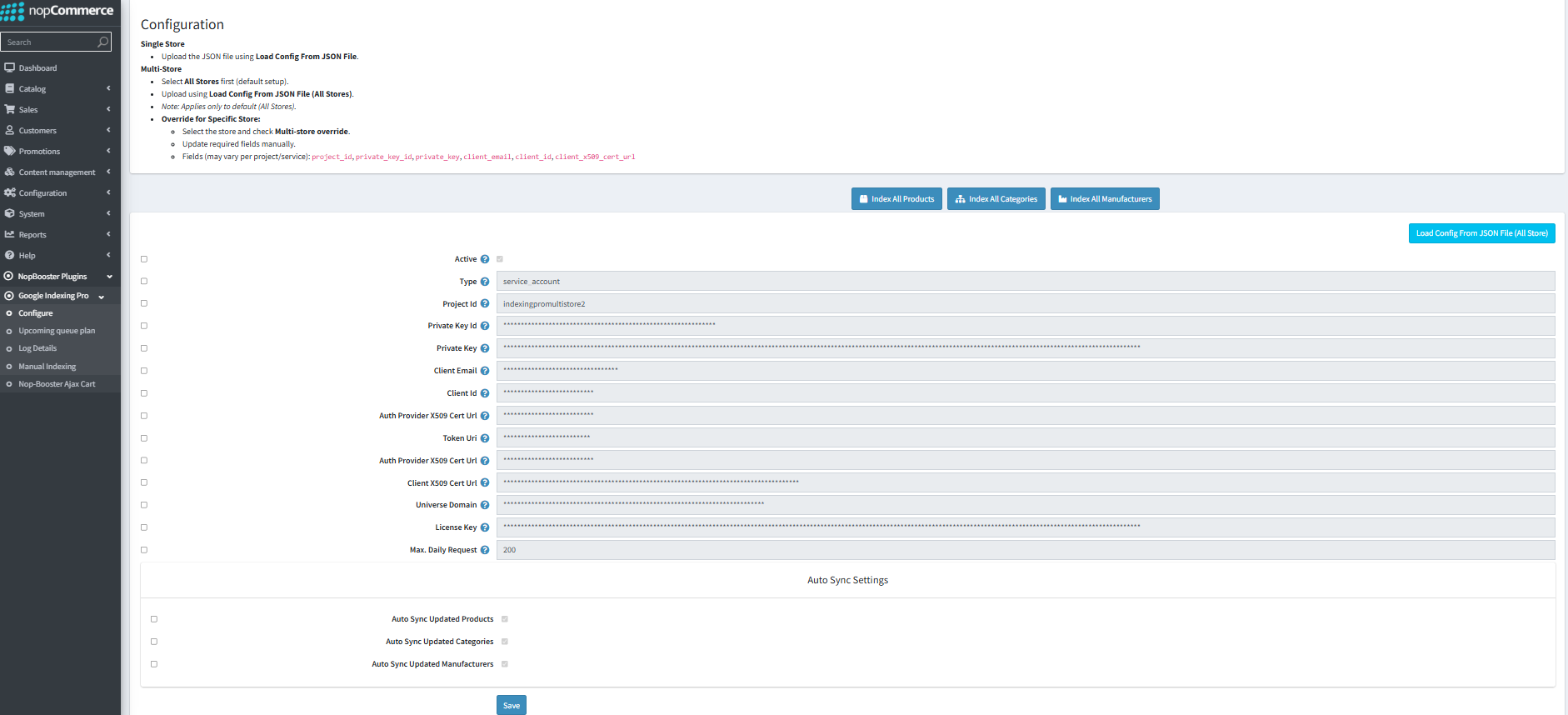
This panel includes:
- Service account authentication using JSON-based credentials along with essential API configuration fields such as Client ID, Private Key, and Token URI
- Max daily request quota settings
- Auto-sync options for products, categories, and manufacturers
- Multi-store configuration support for different store environments
✓ Smart Queue Management Dashboard
Track and manage indexing requests with a scalable queue system. The upcoming queue shows URLs scheduled for indexing in order. Note: this includes logs from the regular queue only (Auto Sync for Products, Manufacturers and Categories).
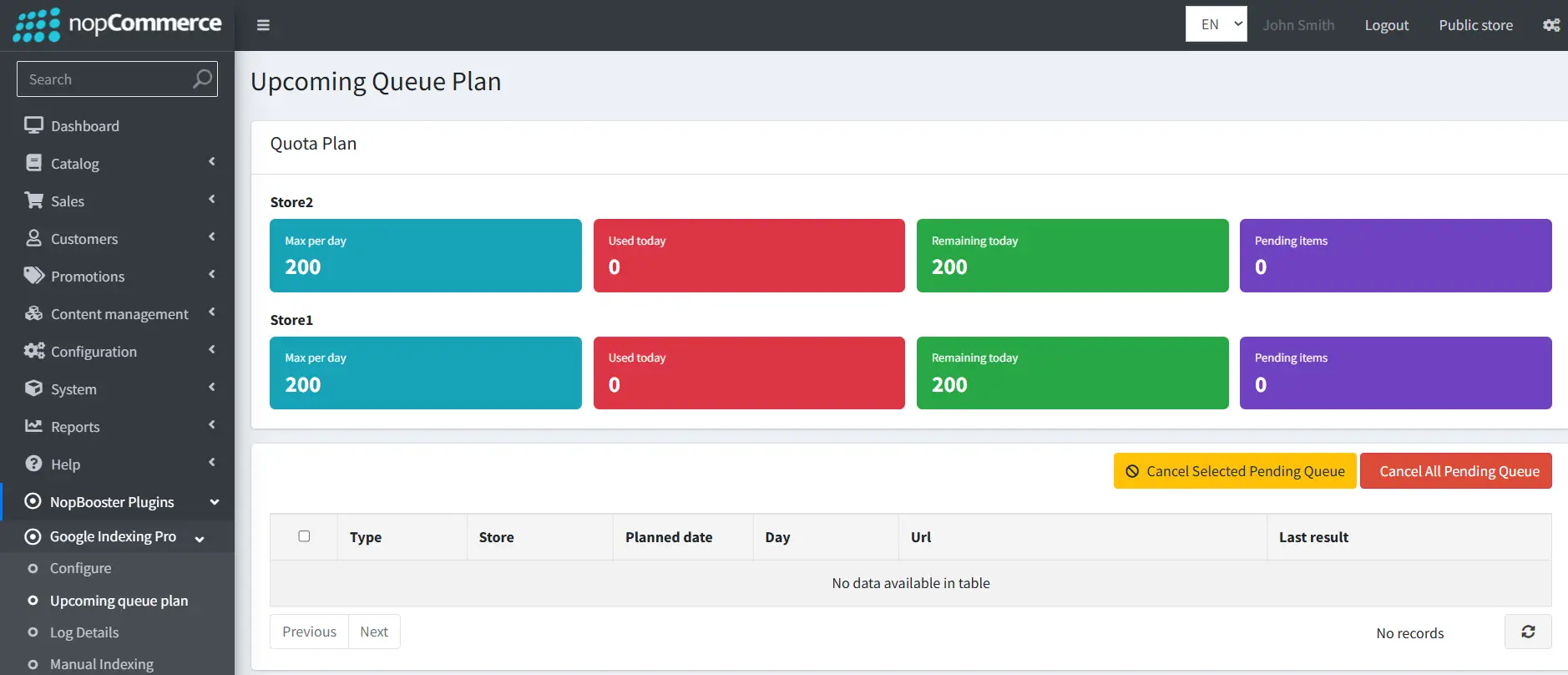
Key highlights:
- Daily quota tracking (Used / Remaining requests)
- Pending indexing tasks with queue scheduling
- Intelligent quota distribution across multiple stores
- Option to cancel individual or all pending requests
- Optimized queue processing to avoid API limits
This ensures you stay within API limits while maintaining optimal indexing performance across all stores.
✓ Detailed Logs & Monitoring
Stay informed with complete indexing logs and performance tracking. These logs include both manual and regular indexing. You can clear completed logs and remove manually indexed entries.
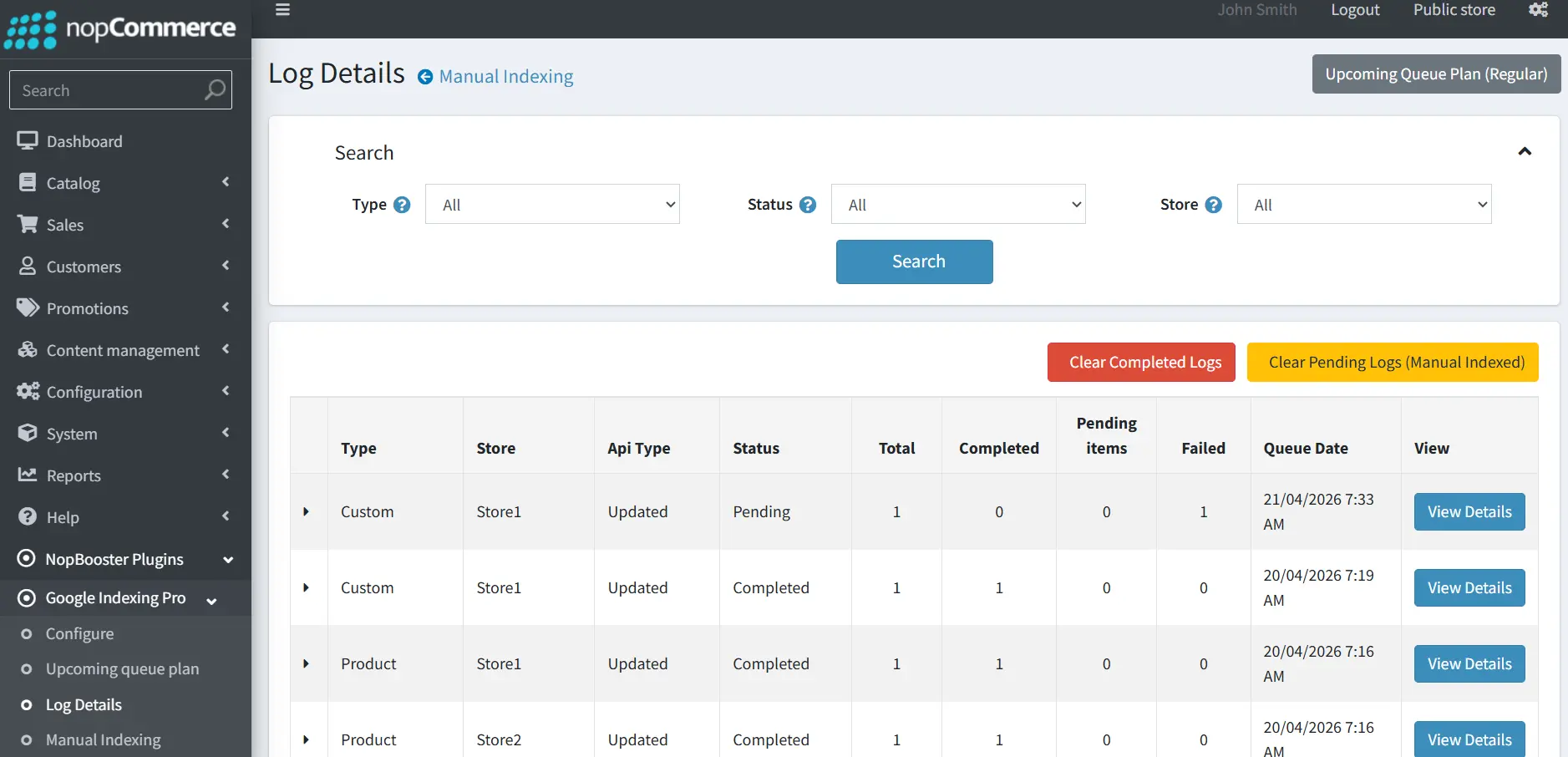 Log insights include:
- Indexing type (Product, Category, Custom, etc.)
- Status (Completed, Pending, Failed)
- Total processed items
- Execution timestamps
- Detailed result view for each request
This level of transparency helps in monitoring, debugging, and optimizing your indexing strategy effectively.
Advanced Manual Indexing System
One of the most powerful features of this plugin is Manual Indexing, giving you full control over what gets indexed across your store.
✓ Manual Indexing – Products, Categories, Manufacturers, Blog post, Custom URLs
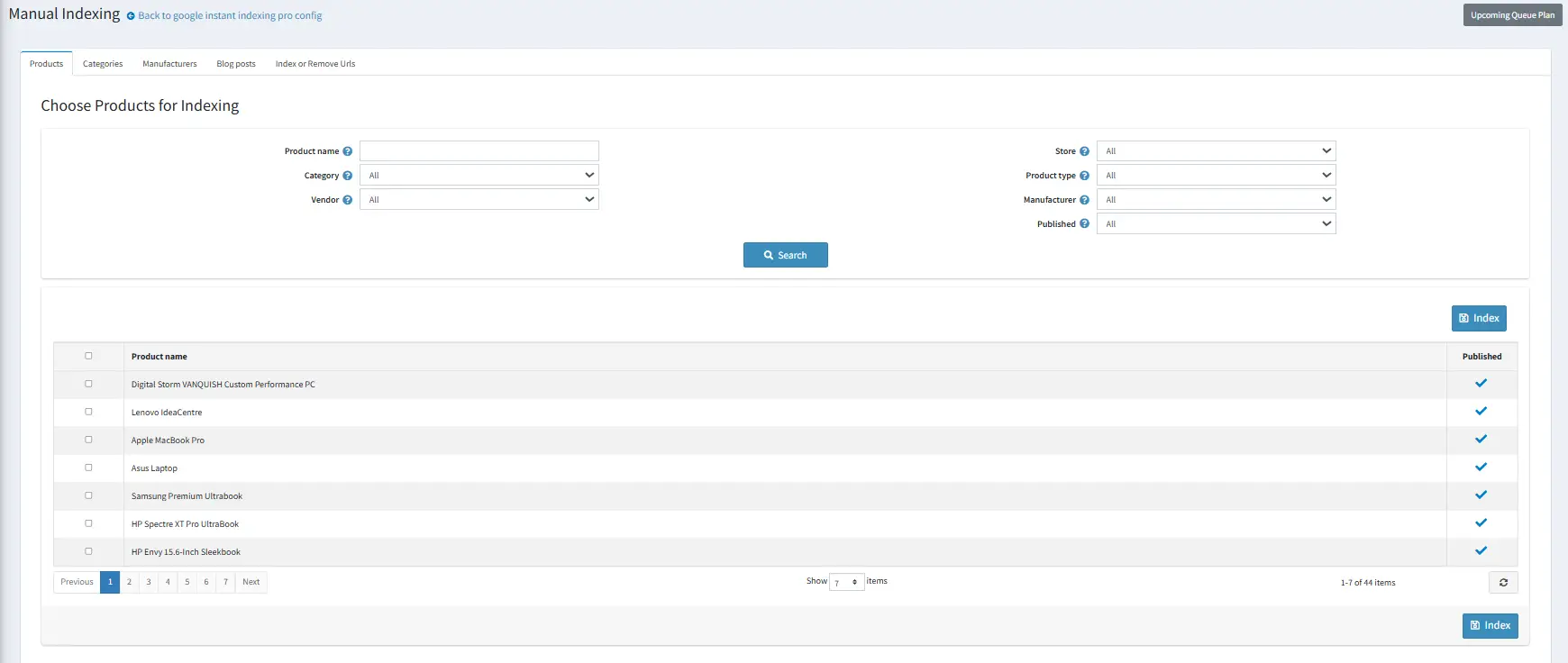
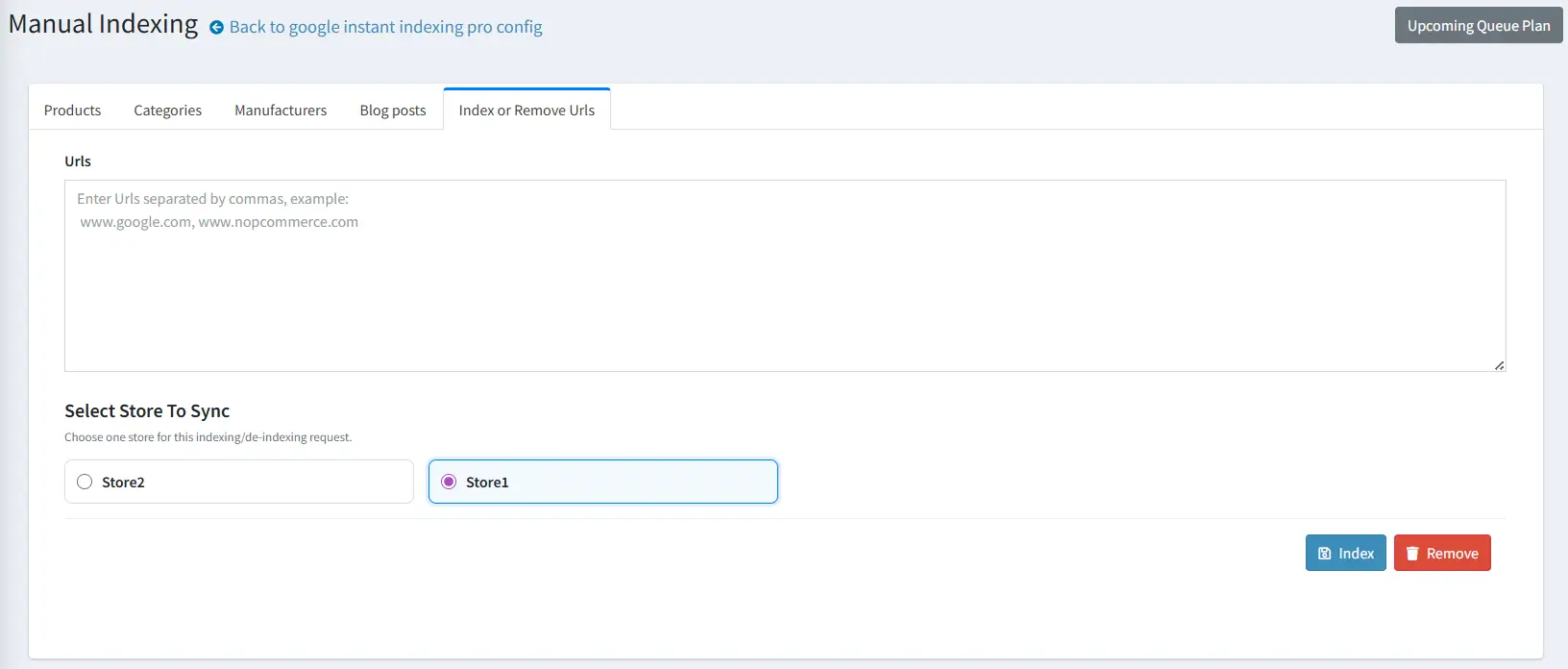
- Index products, categories, manufacturers, and blog posts from one centralized panel
- Ensure fast and timely indexing of new content, updates, and SEO-driven pages
- Support multi-language blog and content indexing for wider reach
- Add or remove multiple custom URLs in bulk with simple input
- Select specific stores for indexing in multi-store environments for precise control
More Features Worth Knowing
✓ Instant Indexing
Submit your product pages, categories, manufacturers, and blog posts directly to Google without waiting for traditional crawling. This ensures your newly added or updated content becomes searchable almost immediately, helping you capture traffic at the right moment—especially during product launches or promotional campaigns.
✓ Auto Sync Functionality
Automatically detects changes in your store such as product updates, category edits, or manufacturer modifications and syncs them with Google in real time. This eliminates the need for manual resubmission and ensures your store data in search results is always accurate and up to date.
✓ Bulk Indexing Actions
Save time and effort by indexing large volumes of content with a single click. Whether you want to index all products, categories, or manufacturers, bulk actions streamline operations—making it ideal for stores with extensive inventories.
✓ Smart Queue & Quota System
Built with an intelligent queue management system, the plugin processes indexing requests based on Google’s daily quota limits. It automatically schedules pending requests, balances load across multiple stores, and ensures no API limits are exceeded—providing a stable and efficient indexing workflow.
✓ Multi-Store Support
Perfect for businesses managing multiple nopCommerce stores, this feature allows you to control indexing for each store from a single dashboard. You can assign requests, manage quotas, and monitor indexing activity independently for each store environment.
✓ Multi-Language Support
Supports indexing for multiple language versions of your content, ensuring your store reaches a global audience. Each localized page is properly submitted and indexed, improving visibility in region-specific search results and enhancing international SEO performance.
✓ Detailed Logs & Tracking
Provides complete transparency into indexing activities with structured logs. You can track request status, success and failure rates, timestamps, and API responses—making it easier to monitor performance, identify issues, and optimize your indexing strategy.
Key Benefits
✓ Improved Search Visibility
By reducing indexing delays, your pages appear in search results faster, increasing the chances of ranking earlier and attracting organic traffic before competitors.
✓ Time Efficiency
Automation and bulk operations significantly reduce manual workload. Instead of submitting URLs individually, the plugin handles indexing processes in the background, freeing up time for strategic tasks.
✓ Real-Time Updates
Any changes made to your store—such as price updates, stock changes, or new content—are reflected quickly in search engines. This ensures customers always see the most accurate and current information.
✓ Higher Conversions
Faster visibility means customers can discover your products sooner. This shortens the time between product launch and purchase, directly contributing to improved conversion rates.
✓ Operational Simplicity
All indexing activities are managed from a centralized, user-friendly dashboard. From configuration to monitoring and manual control, everything is streamlined for ease of use.
✓ Competitive Advantage
While many stores rely on slow, traditional indexing methods, this plugin gives you the ability to act instantly. Faster indexing, better visibility, and real-time updates position your store ahead of competitors in search rankings.
Setup Guide
Guide to get that json file from google for configuring the plugin. Or Check our Blog for more detailed Setup Info
For Video Tutorial Click Here
1. Go to the Google Cloud Console: Open your web browser and go to the Google Cloud Console at https://console.cloud.google.com.
2. Select your project: From the top navigation bar, select the project for which you want to create a service account.
3. Open the IAM & Admin page: On the navigation menu (hamburger menu in the top-left corner), click on "IAM & Admin", then select "Service accounts".
4. Create a new service account:
a. Click on "CREATE SERVICE ACCOUNT" at the top of the page.
b. Enter a name and description for the service account.
c. Click "Create".
5. Grant the service account access to the project(optional):
a. On the "Service account permissions" page, select the role(s) you want to grant to the service account. If you're not sure which roles to assign, consult the documentation for the service you're using.
b. Click "Continue"
6. Grant users access to the service account(optional): If you want other users to have access to this service account, add their emails and select roles for them. Then click "Done".
7. Generate the key:
a. Find the service account you just created in the list and click on it.
b. Go to the "KEYS" tab.
c. Click "ADD KEY" and select "Create new key".
d. Choose "JSON" as the key type and click "Create".
8. Download the JSON key file: Your browser will automatically download the JSON key file. This file contains the private key, and it's important to keep it secure. Do not share this file or commit it to public repositories.
9. Secure your key: Store the downloaded JSON file in a secure location. Your application will need it to authenticate with Google Cloud services.
Important: Remember, the JSON key file provides access to your Google Cloud resources, so it's critical to keep it secure. If you suspect the key has been compromised, you can delete it in the Cloud Console and create a new one.
Important Notes
- Google Indexing API may not be fully supported in Google Merchant Center Next. It is recommended to switch to the Classic Merchant Center version for full functionality.
- Google Indexing API has a default limit of around 200 requests per day. You can combine manual indexing (via Google Search Console—URL Inspection or Sitemap submission) with API-based indexing. It is recommended to initially submit product URLs manually for bulk indexing, and then let the plugin handle ongoing updates and synchronization automatically through the API.
Regular Indexing vs Manual Indexing
Regular Indexing automatically queues URLs (Products, Categories, and Manufacturers) based on the scheduled task. Whenever these entities are updated, their URLs are added to the queue and processed in order.
Manual Indexing submits URLs instantly by calling the API directly, without adding them to the queue.
Note: Upcoming Queue hold Regular Indexed URLs only, while Logs hold both Regular and Manual Indexed URLs.
Who Is This Plugin For?
- NopCommerce store owners focused on SEO growth
- Businesses with frequent product or content updates
- Multi-store environments needing centralized control
- Global stores with multi-language content
- High-volume eCommerce platforms
Ready to Take Control of Your Indexing?
Google Instant Indexing Pro transforms your indexing workflow from passive waiting to active control. With automation, real-time updates, multi-store flexibility, and an intelligent quota-based queue system, it ensures your store stays visible, competitive, and optimized for search engines at all times.
For any assistance contact Nopbooster